
Anchor links, or in-page links, allow users to navigate to a specific section within the same page.
When to Use Anchor Links
Anchor links can be helpful in some cases but should be used with caution. Users generally expect a link to take them to a different page rather than another location on the same page. This can make anchor links disorienting, especially for those using assistive technology.
Anchor links can be beneficial when:
- Used as a table of contents or index to help users navigate lengthy content.
- Providing direct access to relevant or frequently referenced content.
- Offering a "Back to top" link for easy navigation.
Considerations for Anchor Links
- Evaluate content length: Anchor links are most useful for lengthy content. However, users often skim web pages and may not read very long content, even with anchor links. If your content is long enough to require anchor links, consider whether it could be shortened or divided into multiple pages for better readability. Whenever possible, use clear headings and short paragraphs to organize content effectively.
- Use clear and consistent anchor names: The anchor name should concisely describe the purpose of the link (Back to top) or the linked section’s content. Users should immediately understand where the link will take them. Anchor link text should match the heading of the target section to reinforce that they’ve landed in the right place.
- Label anchor link sections: Consider adding a label such as "On this page:" to introduce a section of anchor links. This helps users understand that the links navigate within the same page.
- Understand back button behavior: When a user clicks an anchor link and then presses the browser’s "Back" button, they will return to their previous position on the same page rather than the previous webpage. Keep this in mind when implementing anchor links to avoid confusing navigation.
How to Add an Anchor Link
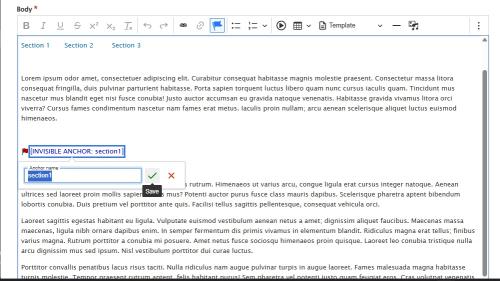
Step 1 is to click on the flag icon in the editor toolbar and add an anchor target where you want to jump to, and give it a name.
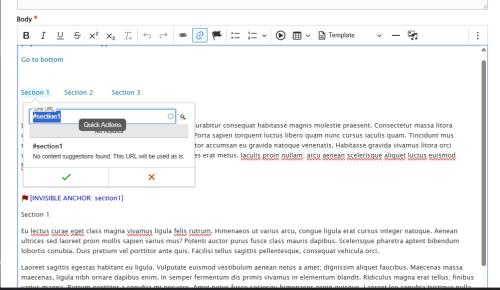
Step 2 is to add text and make a link to the anchor target you've added. The target name should be a # symbol followed by the name you gave your corresponding anchor target. It's recommended to not use spaces in the anchor name.
Anchor Link Example
On This Page:
Tulane University offers a broad range of academic programs designed to support students at every stage of their educational journey. Faculty, staff, and students work together to create an engaging environment focused on learning, research, and professional growth.
Section 1
The university's campuses provide spaces for teaching, collaboration, and student life. From classrooms and laboratories to libraries and community gathering areas, each location supports a variety of academic and campus activities.
Research is an important part of Tulane's mission and contributes to discoveries across many disciplines. Students have opportunities to participate in projects that encourage critical thinking, collaboration, and innovation.
Located in New Orleans, Tulane benefits from a city known for its history, culture, and community partnerships. The university's connection to the region creates opportunities for experiential learning both inside and outside the classroom.
Section 2
Students can choose from undergraduate, graduate, and professional programs across multiple academic schools. Flexible learning options and a wide variety of disciplines allow students to pursue their individual educational goals.
Public service is an important part of the Tulane experience. Students, faculty, and staff regularly engage with community partners through teaching, research, and service initiatives.
Campus resources are available to support students throughout their academic experience. Advising, libraries, technology services, and student organizations help create an environment where learners can succeed.
Section 3
Tulane welcomes visitors throughout the year for campus tours, academic events, and public programs. Guests can explore university facilities while learning more about the institution and its academic offerings.
The university is committed to providing a welcoming learning environment that encourages collaboration and respectful dialogue. Members of the campus community contribute a wide range of experiences and perspectives.